


GOES: Outdoor Health & Safety
3.217.00 Reviews
App Specs
- Version
- 5.5.2
- Updated On
- License
- Free
- Downloads
- 10,000+
- Developer
- GOES Developer
- Categories
- Medical
- Platform
- Android
Screenshots
 Analysis by AppCompare
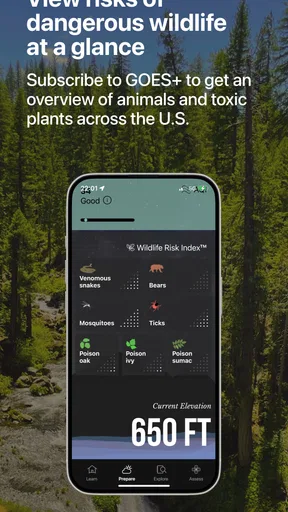
I approached GOES: Outdoor Health & Safety as a practical medical app for people who spend time outside and want a little more structure around health and safety. Its store summary calls it an outdoor guide, but that short description does not really explain how it fits into a normal day. My impression is that it is best treated as a companion for preparation and quick reference, not as a substitute for professional medical care or a complete emergency service.
The app comes from GOES Developer and is free to install, which makes it easy to try without committing money at the start. It is aimed at an Everyone audience, runs on Android devices using version 7.0 or later, and has reached over ten thousand installs. The current version is 5.5.2. Those details make it accessible to many older Android phones, although the experience will still depend on the device and the way the app presents its material.
After spending time with it, I would describe the app as more useful for building confidence before an outdoor activity than for solving a complicated situation in the middle of one. That distinction matters. If you want a polished navigation tool, live weather service, or direct connection to medical professionals, this is not the same kind of product. If you want an outdoor health reference that you can explore before leaving home, it has a more sensible place in your routine.
Getting from installation to a useful first session
Before relying on GOES on an outing, I’d first make sure I can reach the information I care about without having to search while distracted. I’d choose one likely concern for the trip, read the relevant guidance at home, and decide what I’d do if the situation changed. That simple rehearsal also gives me a fair way to judge whether the app’s layout works for me.
What to expect when you open it
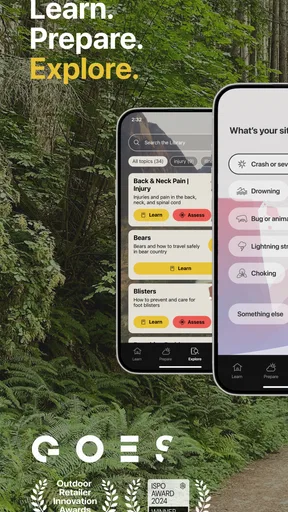
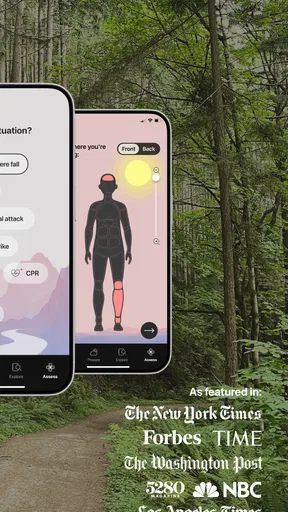
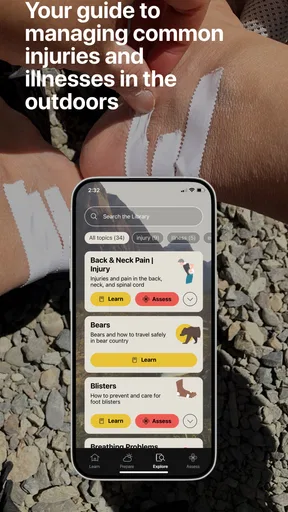
A first-time user should not expect GOES to behave like a conventional fitness tracker. It is not primarily about recording distance, counting steps, or turning a walk into a set of performance charts. Its value is closer to having organized health and safety guidance available while planning an outdoor activity. That makes the first session less about pressing a large “start” button and more about learning how the app’s information is arranged.
I recommend opening it when you are calm and indoors, rather than waiting until you are already at a trailhead or dealing with a problem. Take a few minutes to look through the available areas and notice which topics feel relevant to the activities you actually do. A person who takes short walks in a local park will have different needs from someone who spends a full day hiking, and the app is easier to judge once you use that personal context.
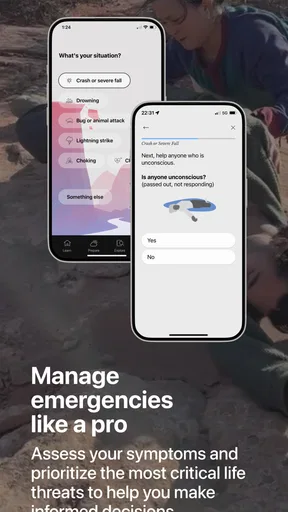
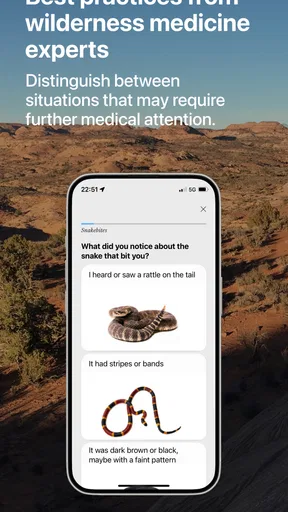
The medical category is important here because it sets the right expectations. Health guidance can be helpful, but it needs to be read carefully and applied with common sense. Outdoor conditions change quickly, and an app cannot see the person in front of you, assess symptoms directly, or replace emergency responders. I would use its information to prepare, recognize a concern, and decide what deserves further help—not to make a risky diagnosis on my own.
Worth Reading Before You Choose

Flipboard Shows What News Apps Must Do Beyond the Feed

Switching to Android Auto Means Rethinking Your Driving Routine

Google Calendar Makes a Crowded Week Easier to Manage

Ludo King Makes the Most of the Minutes Between Plans

Baby Panda World Brings Quick Play to Modern Phones, but Its Game Library Feels Busy

ESPN’s Live Game View Makes Following Close Games Easier
The average rating is 3.2 from roughly forty-six ratings, with around seventeen written reviews. I read that as a sign to keep expectations measured. There is enough interest to show that the concept appeals to outdoor users, but the rating does not suggest a universally smooth experience. For me, that means the app is worth testing personally rather than assuming it will fit every phone, trip, or style of preparation.
How I would handle the first setup
Because the app is free, the sensible first step is simply to install it and explore before relying on it. I would do this at home, while connected to a stable network, and give myself time to understand the layout. The app includes in-app purchases ranging from $1.99 to $99.99 per item, so I would also pay attention to any optional paid material before confirming a purchase. Free installation does not automatically mean every part of the experience is included at no cost.
That is not a reason to avoid the app, but it is a reason to slow down. When I test a health app, I want to know which information is immediately available, which areas lead to an upgrade prompt, and whether I can still understand the basic experience without paying. I would not make a purchase simply because I was preparing for a trip. First I would decide whether the free portion is already useful for my needs and whether the extra material clearly solves a problem I actually have.
Use the first session to create a simple mental map. Look for the content that relates to prevention, outdoor risks, and immediate response. If the app presents several subjects, avoid trying to memorize everything. Instead, identify the few topics most likely to matter on your next outing. This is one of the less obvious ways to get value from a guide: the goal is not to read it from beginning to end, but to reduce the time you need to find a relevant section later.
I would also test the app before leaving home by opening the sections I expect to use and checking how quickly they appear. That small rehearsal can reveal whether the navigation feels obvious on my particular phone. It also prevents a common mistake: assuming that an app is ready for an emergency simply because it is installed. A guide is only useful in a stressful moment if I already know where to look.
The first meaningful success
For a new user, the first successful action should be modest and concrete. Choose an upcoming outdoor activity, then use GOES to review the health and safety information that relates to it. For example, before an afternoon walk, I might browse the relevant guidance, note the warning signs that would make me stop, and decide what basic supplies or contact plans I should have before setting out.
This approach is better than opening random pages. It gives the app a job and gives me a clear test: can I move from a general concern to a practical decision? If I finish the session knowing what I want to watch for, when I should turn back, and where to find the relevant information again, the app has already achieved something useful.
Another good first action is to use the guide with a companion. Read a section together before a hike or camping trip and agree on what you would do if one of you became unwell. This is especially helpful because safety information is easier to use when it has already been discussed. In a real situation, I would rather have a simple shared plan than depend on one person trying to interpret unfamiliar material under pressure.
Keep the app in its proper role during this exercise. It can support preparation and awareness, but it should not encourage you to ignore serious symptoms or delay emergency help. If someone has a severe or rapidly worsening problem, contacting local emergency services and following professional advice takes priority. I see the app as a way to improve readiness, not as permission to take greater risks outdoors.
Where first-time users may become confused
The biggest possible confusion is the difference between an outdoor guide and a live emergency system. A guide may help me understand a situation, but that does not mean it automatically knows my location, contacts rescue services, or provides a professional assessment. I would never wait for an app screen to tell me whether a serious emergency deserves help. That decision belongs to the person present and, when needed, qualified responders.
Another point to clarify is the relationship between health information and individual circumstances. Advice that is sensible for a generally healthy adult may not apply in the same way to a child, an older person, or someone with an existing medical condition. The Everyone age rating describes the intended audience for the app, not a guarantee that every piece of guidance is equally suitable for every person. I would treat personal medical advice from a clinician as more specific than general app content.
Paid content can create a different kind of uncertainty. Since purchases are available inside the app, I would read each purchase screen carefully and avoid assuming that paying is necessary for basic orientation. The price range is broad enough that a casual user should decide based on actual usefulness, not curiosity. If the free material helps me prepare for ordinary outings, I may not need anything more. If I need a specialized reference, I would compare the cost with a trusted medical book, course, or professional resource before buying.
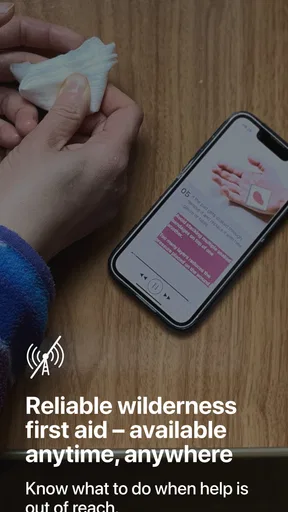
There is also a practical issue with using any phone-based reference outdoors: the device may be difficult to use in bright sunlight, cold weather, rain, or while wearing gloves. I would not make the app my only safety resource. Before leaving, I would note the most important points in a way I can access easily and tell another person where I am going. This is not a criticism unique to GOES; it is the trade-off of carrying guidance on a phone instead of using a printed field reference.
Three ways to use it more intelligently
The best workflow is to prepare around a specific outing, not browse without a purpose. Before a short walk, I would choose one or two likely concerns and review them. Before a longer trip, I would repeat that process with the group, identify the information that matters most, and make sure everyone knows the basic plan. This turns a broad medical guide into a small checklist for the day.
A second useful habit is to separate prevention from response. I would first ask what I can do to reduce the chance of a problem, then look at what signs would tell me to stop or seek help. That order prevents the common mistake of treating first-aid information as a challenge to continue an activity. The app becomes more valuable when it changes my decisions before a problem becomes serious.
A third insight is to test the app during an ordinary outing rather than during a dramatic scenario. Use it after a normal park visit or easy trail walk and ask whether the content was easy to find, understandable, and relevant. If the app feels confusing when there is no pressure, it will probably feel worse when I am tired or worried. This low-risk trial is a much better measure than judging it from the store page alone.
I would also keep a second source available. A reliable weather service, a map, local emergency information, and a personal medical plan each serve a different purpose. GOES may complement those tools, but it should not be expected to replace them. The trade-off is convenience versus specialization: one app can make preparation simpler, while separate tools may provide deeper information in their own areas.
Who will benefit, and who should skip it
I think GOES is most suitable for a first-time outdoor participant, a casual hiker, a family planning simple day trips, or anyone who wants to become more deliberate about health and safety outside. It can also help a nervous beginner organize questions before asking a doctor or experienced outdoor partner. The free entry point makes that kind of trial practical, provided the user is comfortable reviewing optional purchases carefully.
I would be more cautious recommending it to someone who needs professional medical monitoring, detailed expedition planning, or dependable emergency communication. People with complex health conditions should rely on individualized clinical advice. Experienced outdoor users who already carry a trusted field manual and have a well-practiced response plan may find the app less valuable, especially if they want advanced navigation or live environmental information rather than general guidance.
It is also not the right choice for someone who wants a highly polished, data-driven outdoor dashboard. GOES is better understood through its medical and safety purpose than through the expectations created by fitness, mapping, or weather apps. Comparing it with those alternatives is useful: a weather app may be better for current conditions, a map app for route decisions, and a professional service for urgent medical questions. GOES makes the most sense in the space between preparation and quick reference.
My next step after the first session
Once I had explored the app, I would choose one realistic scenario and repeat the workflow without rushing. Imagine arriving at a park with a friend, noticing that one of you feels unwell, and needing to decide whether to rest, leave, or seek help. I would review the relevant material beforehand, discuss what information matters, and make sure the phone is charged. The point is not to rehearse a frightening event in detail; it is to remove avoidable hesitation.
After that, I would decide whether the app deserves a permanent place on my phone. The answer depends on whether I can find useful guidance quickly and whether it improves my preparation enough to justify keeping it. I would not judge it by the number of screens or by how much content it appears to contain. I would judge it by a simpler question: does it help me make safer, calmer decisions before and during an outdoor activity?
My overall view is cautiously positive. GOES is most convincing as a preparation tool, not as a complete outdoor safety system. Its medical focus gives it a clear purpose, and the free download makes it approachable for beginners. At the same time, the middling 3.2 average, the possibility of paid items, and the limits of phone-based guidance mean I would use it selectively and keep other resources available.
If you are new to outdoor activities, install it before your next outing, explore it at home, and test one relevant section during a low-risk trip. That path gives you a fair impression without depending on it too heavily. I would recommend GOES: Outdoor Health & Safety to readers who want a straightforward health-and-safety reference and are willing to combine it with common sense, local emergency resources, and professional advice when necessary. For anyone seeking live navigation, weather data, or direct medical support, a different app or service will be the better choice.
Pros
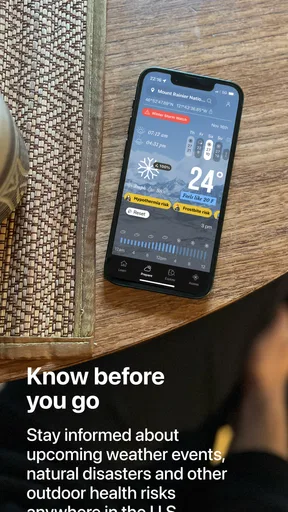
- Official NOAA weather and hazard data supports informed outdoor decisions.
- Useful for monitoring storms
- wildfires
- floods
- and other environmental threats.
- Location-based alerts can help users stay aware while traveling or exploring.
- Combines health
- safety
- and weather information in one focused app.
- Relevant for hikers
- campers
- boaters
- and other outdoor enthusiasts.
Cons
- Some features may depend on reliable GPS and mobile data coverage.
- Alerts and forecasts can vary in accuracy by location and local reporting.
- Frequent notifications may feel excessive during periods of severe weather.
- The app may be less useful for everyday users who rarely spend time outdoors.
- Battery usage can increase when location services and background alerts are enabled.
FAQs for GOES: Outdoor Health & Safety
What is GOES: Outdoor Health & Safety used for?
GOES is designed to support people during outdoor activities by combining safety tools, location-based information, and health-related guidance in one app. It can be useful for hiking, camping, travel, and other adventures where access to help or reliable information may be limited. Before relying on it, users should explore its features and understand which functions require an internet connection, GPS, or additional setup.
Does GOES work without an internet connection?
Some outdoor safety features may continue working when mobile data is unavailable, particularly those based on your phone’s GPS or previously downloaded information. However, functions such as sharing live location, contacting emergency services, syncing data, or receiving updated alerts may require an internet or cellular connection. Users should prepare offline resources and never treat the app as a replacement for a map, local knowledge, or emergency equipment.
Can GOES automatically contact emergency services?
GOES may provide tools intended to help users communicate their location or request assistance, but availability can depend on the device, operating system, region, permissions, and network coverage. It should not be assumed that the app can automatically reach emergency responders in every situation. Before heading outdoors, check how its emergency features work and keep local emergency numbers and alternative communication methods available.
What permissions does GOES require?
Because GOES focuses on outdoor health and safety, it may request access to location services, notifications, motion or activity information, and possibly other device functions used by its safety tools. These permissions help provide accurate location data, alerts, or activity-related features. Review each permission before granting it, and remember that disabling certain access may limit the app’s performance or prevent specific features from working properly.
Is GOES suitable for serious emergencies or medical advice?
GOES can be a helpful companion for planning and managing outdoor activities, but it should not be considered a substitute for professional medical care, trained rescue personnel, or proper preparation. Information displayed in the app may not cover every medical condition or emergency scenario. In a life-threatening situation, contact the appropriate emergency service immediately, follow official instructions, and use the app only as an additional support tool.


